
 EN
EN
 FR
FR DE
DE JA
JA KO
KO RU
RU ES
ES AR
AR IT
IT
Awnlux (Shanghai) focuses on the research, development, and production of RV awning systems and smart control solutions, taking smart integration technology as its core product development direction.
At the Caravan Salon Düsseldorf 2026, Awnlux exhibited its Ultra Smart Control system and Solarawn solar awning across two booths. Through real-vehicle demonstrations, the company showcased core technologies including Bluetooth control, dual-bus (CAN/485) communication, and full-vehicle integration to global RV manufacturers, upfitters, and dealers. During the exhibition, its product technology attracted significant industry attention, and the Polish RV media Polski Caravaning visited the booth for on-site coverage to promote the smart and solar awning solutions in overseas markets.
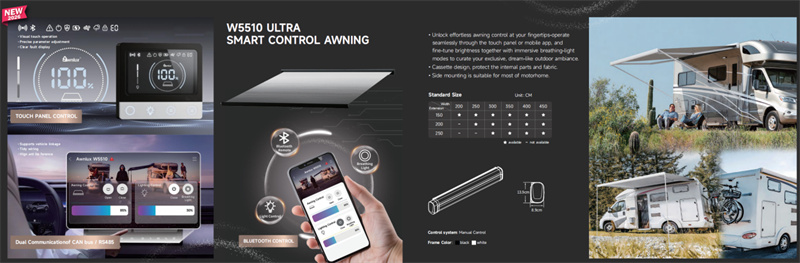
Its W5510 smart awning is equipped with a three-layer control system: a local panel, a Bluetooth APP, and a CAN/485 bus vehicle central control. This system accommodates daily owner use, customization and tuning, and professional RV OEM matching, fully covering smart mobile living needs across all scenarios.
I. What Problems Do the Three W5510 Control Solutions Solve?
Traditional electric awnings primarily solve the issue of "extending and retracting"; the W5510 Smart Electric goes a step further by providing a three-layer control system:
- Local Touch LCD Panel Control:
Wired on-site operation and fault diagnosis;
-
Awnlinka Bluetooth App:
Smartphone close-range control and fine tuning;
3. CANbus/RS485 Vehicle Central Control:
Integrating into the RV's central control system to achieve full-vehicle linkage.
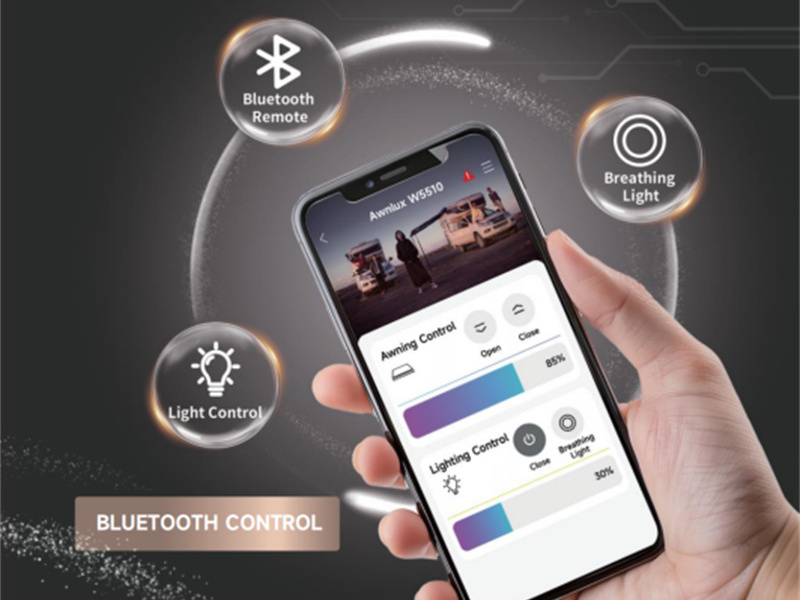
The Awnlux W5510 Smart Control RV Awning's smart version supports Bluetooth App, in-vehicle control panel, and vehicle system control. These three methods can work independently and simultaneously, supporting downloads from iOS/Android app stores.
II. Functional Breakdown of the Three Control Methods
1. W5510 Local Touch LCD Panel Control:
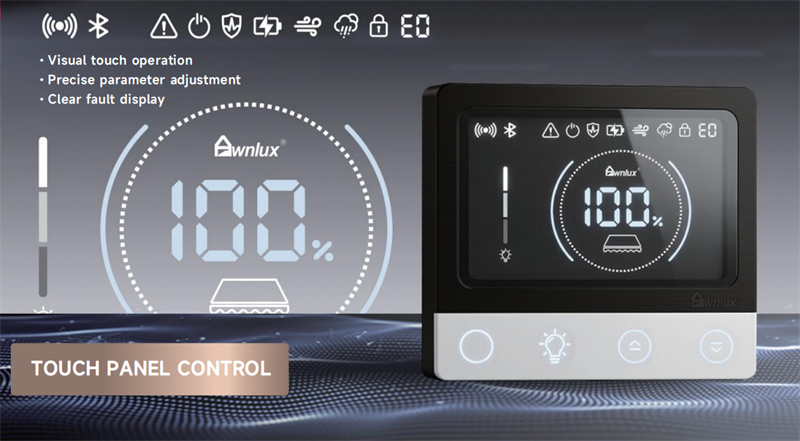
The local panel connects to the awning's main control system via a wired connection. It does not rely on smartphone Bluetooth or the vehicle's network, serving as a fixed entry point for on-site operation and maintenance diagnosis. According to the W5510 panel blueprints, the panel consists of an LCD status display area and physical buttons.
|
Panel Function |
Role / Action |
|
Open/Close Awning |
Automatic extension or retraction; long press for inching/fine-tuning (specific logic depends on controller settings). |
|
Settings/Emergency Stop |
Setting functions or interrupting the current running action. |
|
LED Light Strip Button |
Controls the LED light strip switch; brightness display depends on the configuration. |
|
Status Display |
Awning extension percentage, light strip brightness, power, and Bluetooth status. |
|
Environmental Alerts |
Status alerts for sensors such as wind, rain, and snow. |
|
Fault Display |
Information on voltage, short circuits, locked-rotor (stalling), encoder, and timeout protection. |
Panel Fault Code Reference: According to the W5510 project documentation, codes 1–8 correspond to abnormal voltage, motor short circuit, light strip short circuit, motor locked-rotor (stalling), encoder anomaly, misoperation/timeout protection, high wind alert, and rain/snow alert, respectively. Official after-sales handling should be based on the controller manual provided with the product.
2. Awnlinka Bluetooth App Control
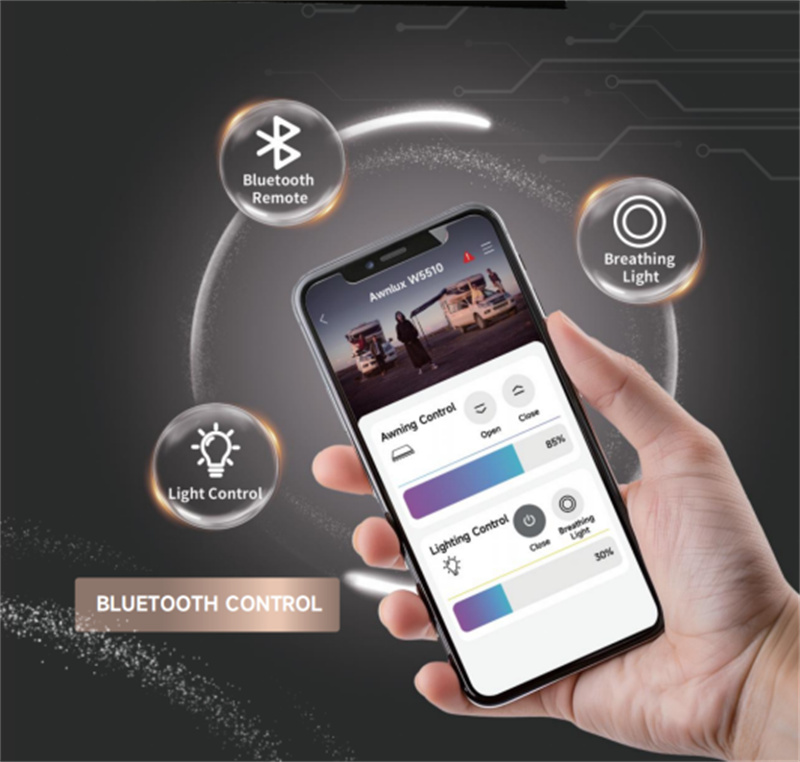
The Awnlinka App connects to the W5510 smart control module via Bluetooth, without requiring Wi-Fi or cellular networks. The App supports iOS/Android, with a close-range control radius of approximately 10 meters.
3. CAN/RS485 Bus Vehicle Central Control
According to the W5510 project documentation, the main control system can adapt to CAN-BUS or RS485 based on the vehicle's electronic control architecture. Bus control is not as simple as adding an extra switch; it involves interfaces, wiring harnesses, communication parameters, protocol mapping, and central screen compatibility.
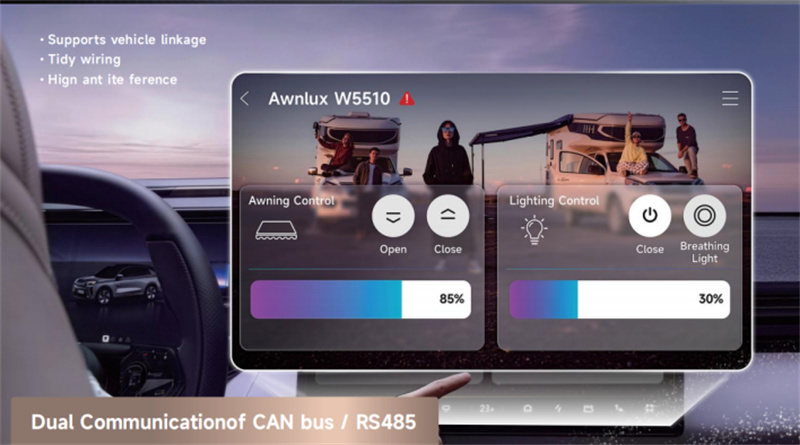
III. Comparison Table of the Unique Advantages of Awnlux W5510's Three Major Control Methods
|
Control Type |
Unique Core Benefits |
|
Local LCD Panel |
1. Wired direct connection: Basic operation does not rely on Bluetooth or network; serves as the system backup entrance. |
|
Awnlinka Bluetooth App |
1. 10-meter range: Convenient operation from inside the vehicle, the rear kitchen, or camping chairs. |
|
CAN/RS485 Bus Vehicle Central Control |
1. Flexible adaptation: Supports CAN or RS485 to match the vehicle's electronic architecture for easy integration. |
IV. Recommended Matching and Selection Guide for W5510
|
User / Project Type |
Recommended Setup |
Key Benefits |
|
Entry-level DIY van conversions, basic camper vans, senior RV enthusiasts |
Local panel + Awnlinka App |
Lower cost and maintenance burden, while gaining on-site fallback and mobile control |
|
Experienced campers, multi-family groups, long-term cross-border self-driving trips |
Local panel + Awnlinka App |
More flexible for multi-user use; awning can be adjusted within the campsite; the panel serves for emergencies and diagnostics |
|
Imported premium RVs, OEM smart cockpit projects |
Local panel + App + CAN vehicle master controller |
Connects to the existing CAN network for centralized in-vehicle control and scene linkage |
|
Domestically converted vans, trailers, centralized-control conversion projects |
Local panel + App + RS485 vehicle master controller |
After protocols and wiring harnesses are confirmed, enables flexible whole-vehicle system integration |
|
OEM or fleet-scale projects |
Three-entry combo + standardized protocols / after-sales solution |
Facilitates training, fault diagnosis, module replacement, and batch maintenance |
The three control methods can be used in parallel, but more entry points mean higher requirements for permissions, wiring harnesses, protocols, software versions, and after-sales training. The technical specification sheet must clearly define: main control, backup control, supported actions, fault feedback, emergency methods, and vehicle adaptation boundaries.
V. FAQ
1.How many control methods does the W5510 ultra smart version support?
Official data shows that the W5510 Smart Electric supports Bluetooth App, in-vehicle control panel, and vehicle system integration. These three methods can work independently and simultaneously, while retaining a manual emergency retraction solution.
2. Does the Awnlinka App require Wi-Fi?
Bluetooth local control does not require Wi-Fi or cellular networks, but the smartphone and the control module must maintain a Bluetooth connection, and the vehicle power supply must function normally.
3. How should I choose between CAN and RS485?
First confirm the interface, protocol, and wiring harness definitions of the RV's existing central control system. CAN is suitable for projects with an existing CAN network; upfitting projects using RS485 central control should confirm according to the RS485 solution, and selection cannot be inferred solely by the vehicle's place of origin.
4. Can the Bluetooth App replace the local panel?
It is not recommended to eliminate the local panel, as multi-entry designs reduce communication failure risks.
5. Which RV types is the W5510 suitable for?
The W5510 is a wall-mounted full cassette awning for Vans, Class B, Class C, compact RVs, and travel trailers, pending project verification.
Ⅵ. Interested in Awnlux Products?
Contact Awnlux for product materials, configurations, and OEM/ODM solutions regarding smart awnings and control systems.
- Email: [email protected]
- Official Website: www.awnlux.com
- E-Commerce Website: www.awnluxpro.com
- Tel: +86-21 57793893
- YouTube: https://www.youtube.com/@awnluxrvawning1619
Distributors, RV converters, and end users can select the most suitable awning solution based on vehicle model, installation position, awning size, and preferred control system.
After confirming the suitable configuration, you are welcome to choose Awnlux W5510 and other RV awning solutions to create a more convenient, reliable, and comfortable outdoor living experience.
Product Consultation & Purchase Guidance:
● RV Owners: Please provide your vehicle model, installation location, and main usage scenarios.
● RV Converters: Please provide vehicle electrical system information, CAN/RS485 interface details, and existing control system requirements.
● Distributors / OEM Partners: Please provide your target market, estimated order quantity, required dimensions, fabric/frame colors, and branding customization needs.
Reference Links:
1.Awnlux W5510 Full Cassette RV Awning — Manual or Smart Electric
2.Smart Control Guide for Awnlux W5510 Awning
3.Awnlux at Caravan Salon Düsseldorf 2026: RV Intelligent Control & Solar Solarawn Awning Solutions
4. Awnlux Exhibition Update: Polski Caravaning Highlights Solar Awning and Smart Control Solutions
Get in touch
Table of Contents
- I. What Problems Do the Three W5510 Control Solutions Solve?
- II. Functional Breakdown of the Three Control Methods
- III. Comparison Table of the Unique Advantages of Awnlux W5510's Three Major Control Methods
- IV. Recommended Matching and Selection Guide for W5510
- V. FAQ
- Ⅵ. Interested in Awnlux Products?